
Portada » Engineering » SOLIDWORKS Design
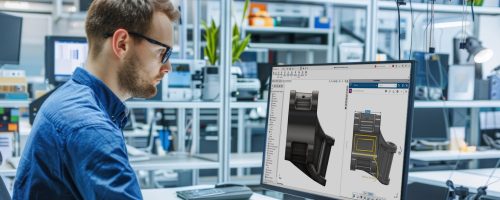
Turn your ideas into reality with SOLIDWORKS software. Design in 2D and 3D—get the world’s most widely used software.
Save costs, improve product design quality, and reduce cycle times with this tool. SOLIDWORKS Design, with its user-friendly interface, makes it very easy for users to work.
What is SOLIDWORKS Design?
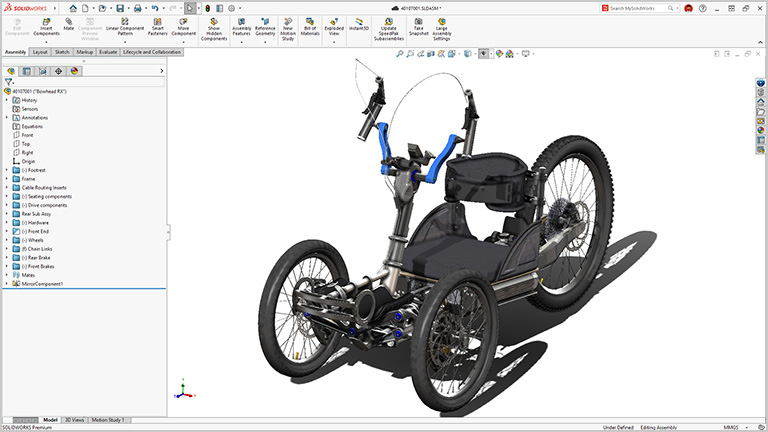
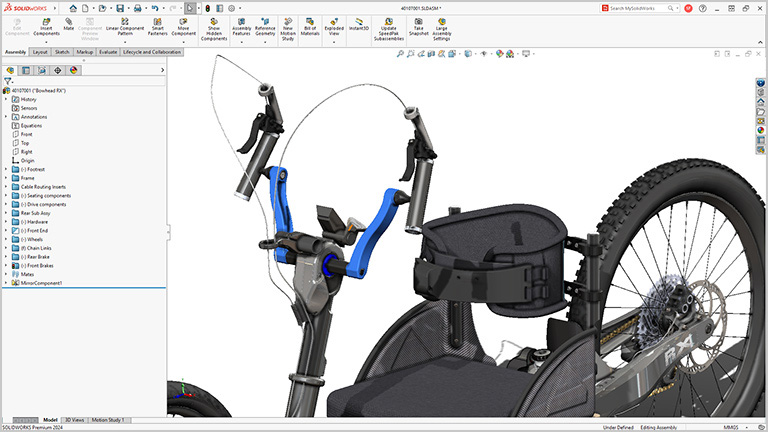
SOLIDWORKS Design is the most comprehensive design and modeling software on the market. It provides engineers, designers, and manufacturers with the most powerful tools for creating accurate virtual models.
It forms the foundation of the entire SOLIDWORKS ecosystem of solutions, offering seamless integration with the other tools in the portfolio: PDM, Electrical, Simulation, CAM, Composer, Visualize, and many more.
Millions of users worldwide use it every day to bring their ideas to life and achieve maximum efficiency.
A standard for industrial design
SOLIDWORKS Design is the choice of professionals looking to efficiently turn ideas into products, with intuitive tools and an ecosystem designed to foster creativity and collaboration. Decades of evolution based on user feedback have made this 3D CAD software a powerful, accessible, and surprisingly easy-to-use solution.
- Advanced, reliable, and versatile 3D modeling
- Documentation and 2D drawings ready for manufacturing
- Intuitive interface, designed by engineers for engineers
- Real-time collaboration for sharing and reviewing designs
- Secure file and version management in the cloud
- Optimized workflows for manufacturing and production
- Integrated simulation, rendering, and CAM for a comprehensive development process
Benefits of SOLIDWORKS Design

Powerful and accurate 3D modeling
Create complex models using advanced parametric design tools, surfaces, and assemblies.

Optimizing development time
Automate repetitive tasks, speed up prototyping, and shorten design cycles.

Don't overcomplicate things
SOLIDWORKS is easy to implement and learn, and we also offer courses to help you get up to speed quickly.

Reduce design costs and errors
Accelerate product development, reduce manufacturing costs, and improve the quality and reliability of your products.

Integration with Simulation and Analysis
It allows you to test and validate designs using structural, thermal, and motion simulation tools before manufacturing.

Real-time collaboration
Share and review designs with teams anywhere using cloud-based collaboration tools and version control.

Manufacturing documentation and drawings
It automatically generates technical drawings, bills of materials (BOMs), and accurate production documentation.

Manufacturing compatibility
It includes CAM tools for manufacturing, 3D printing, and design for manufacturing (DFM).

Secure data management
Organize and track versions of CAD files using integrated cloud-based or on-premises document management systems.

Cloud Services
Get the most out of your license with the Cloud Services included in all current SOLIDWORKS licenses.

Interoperability with other CAD formats
Import and export files in a wide variety of formats, making it easier to work with clients and suppliers who use different platforms.

Large community and support
Access an extensive network of users, tutorials, and technical support to answer any questions or improve your skills.

SOLIDWORKS Design 2026 Licenses
Choose from the different 3D CAD licenses
SOLIDWORKS Design Standard
SOLIDWORKS Standard is a 3D design solution that lets you quickly create parts, assemblies, and 2D drawings using tools for surfaces, molds, sheet metal, and welded parts.
SOLIDWORKS Design Professional
Building on the capabilities of SOLIDWORKS Standard, boost your design productivity with advanced tools such as photorealistic rendering, manufacturing cost estimation tools, and design error detection.
SOLIDWORKS Design Premium
The Premium version of SOLIDWORKS is a comprehensive 3D design solution equipped with powerful design simulation and validation tools, reverse engineering capabilities, and features for routing pipes and cables. It also includes a document management system to optimize efficiency and interdepartmental communication.
License
SOLIDWORKS Design Standard
- Modeling of parts and assemblies, and 2D drawings
- Design Reuse and Automation
- Collaboration: Management, Sharing, and Tagging of CAD Data
- Design and manufacturability checks
- CAM Programming (SOLIDWORKS CAM)
- Advanced import and export of CAD files plus 3D Interconnect
- A collaboration between ECAD and MCAD (CircuitWorks)
- Training and Support
License
SOLIDWORKS Design Professional
All the features included in SOLIDWORKS Standard, plus:
- CAD Libraries (SOLIDWORKS Toolbox)
- Design by Cost (SOLIDWORKS Costing)
- Verification of CAD standards (Design Checker)
- Advanced photorealistic rendering (SOLIDWORKS Visualize)
License
SOLIDWORKS Design Premium
All the features included in SOLIDWORKS Professional, plus:
- Time-based motion analysis
- Linear static analysis for parts and assemblies
- Tour: Electrical panels, pipes, tubes, and conduits
- Sustainability Analysis
Discover the different licensing and deployment options
The same trusted 3D CAD solution, now with two licensing options, deployment models, and cloud connectivity.
SOLIDWORKS Design is available in two modes: first, a single-user license, which allows nominal access from different devices and immediate connection to the cloud; second, a device license—whether tied to a specific computer or floating on a network—that includes the option to activate cloud capabilities at any time.
Both options feature the same functionalities, capabilities, and the same 3D CAD user interface. The main difference between them lies in the acquisition model, the deployment method, and the type of connection to the 3DEXPERIENCE platform and cloud services.
User License
- Individual cloud license, assigned to a specific user and accessible from multiple devices
- Instant access to all cloud capabilities
- Reduced IT burden thanks to a simplified on-premises installation managed from the cloud
- Automatic updates with each new release
- Quarterly or annual subscription options.
Device License
- Device license, tied to a specific device and accessible to any user on that device via the serial number
- You can enable the connection to cloud capabilities at any time
- Installation managed locally or via a network deployment
- Option to work with multiple major versions or specific minor versions
- Quarterly, annual, or perpetual licensing options.
TRY SOLIDWORKS FOR FREE
Download the latest version of SOLIDWORKS Design Premium for free and try it today
SOLIDWORKS Design Capabilities
From modeling complex parts and assemblies to simulation, rendering, and the rapid creation of production-ready technical drawings, SOLIDWORKS 3D CAD has established itself as the industry standard. Designed to turn ideas into products faster and more easily, this software offers an optimized workflow that connects every stage of design with manufacturing.
Design and manufacturing integrated in SOLIDWORKS
- With advanced features for solid modeling, assemblies, and reviewing large designs, SOLIDWORKS 3D CAD gives you the tools you need to take your ideas beyond what you ever imagined. You’ll be able to handle even the most complex products and assemblies with ease and precision.
- Professional drawings are fast, intuitive, and production-ready, whether you're working with 2D drawings, 3D annotations, or need integration with CAM capabilities. SOLIDWORKS supports you from concept to seamless manufacturing.
- In addition, we roll out continuous improvements in performance and capabilities every year, ensuring that you always have the most advanced tools for product development.
Streamline your daily work
- SOLIDWORKS offers specialized features that cover everything from the design of welded parts and toolpaths to the creation of molds, sheet metal, and much more.
- With SOLIDWORKS Toolbox, you can easily create drill holes and assemble hardware components—such as fasteners, nuts, washers, and bolts—to efficiently meet all your needs.
- Developed by engineers for engineers, this 3D CAD software has evolved over more than 30 years, anticipating future design needs and adapting to the way you work, while consistently incorporating improvements suggested by users.
Get involved now more than ever
- Easily share your CAD designs with collaborators, clients, or suppliers using secure SOLIDWORKS links without sending any physical files, while maintaining control at all times.
- 3D annotation. Get feedback from stakeholders. Share your models so others can review and annotate them. All from a web browser.
- Don't waste time sharing versions via email. Manage and share your files and versions directly in SOLIDWORKS. Your internal and external collaborators will be able to review your designs without needing any additional software.
Secure data management in the cloud
- Storage optimized for CAD. Unlike conventional cloud storage services, SOLIDWORKS 3D CAD offers storage specifically designed to manage the interrelationships between CAD files.
- With full version control, you can ensure that you're always working with the latest revision and avoid accidentally overwriting files.
- Automated and support functions reduce repetitive tasks, streamlining 3D CAD workflows to maximize your productivity.
OFFICIAL SOLIDWORKS DISTRIBUTOR IN SPAIN AND PORTUGAL
We are your trusted partner if you're looking for genuine support, not just a license.

We are the #1 distributor in Iberia
For over 25 years, we have been supporting more than 4,000 clients in Spain and Portugal. Our team of SOLIDWORKS experts is here to assist you.

Speed up your work with our exclusive tools
Our IberTools automate repetitive tasks so you can streamline your design processes.

Resolve issues without interrupting your production
Get 24/7 remote technical support: our SOLIDWORKS specialists will guide you every step of the way.

Free online training courses
Exclusive training that covers everything from the basics to advanced features, designed to enhance your design skills.

Stay up to date with our training sessions
We offer live webinars where we address real-world scenarios, best practices, and the latest updates to help you master SOLIDWORKS.

You'll always be working with the latest version
Enjoy performance improvements, enhanced security, and new features without any interruptions.

Take advantage of your member area
Manage licenses, download exclusive resources, and stay up to date on the latest news. Don't waste any more time searching for information.

Join a community that helps you grow
Join forums, earn official certifications, and share experiences with professionals who, like you, are experts in SOLIDWORKS.
Ask us for a no-obligation quote
Contact us, and one of our specialists will get in touch to answer all your questions.
Frequently Asked Questions (FAQ)
What is SOLIDWORKS Design, and what is it used for?
SOLIDWORKS Design is an industry-leading computer-aided design (CAD) software used by engineers and designers to create, model, and optimize 3D products. It is used in sectors such as manufacturing, automotive, aerospace, electronics, and more, facilitating product development from concept to production.
What are the main advantages of SOLIDWORKS Design?
- Intuitive, easy-to-learn interface.
- Advanced 3D modeling for complex parts and assemblies.
- Integration with simulation, rendering, and CAM tools.
- Cloud-based collaboration for efficient teamwork.
- Production-ready documentation and drawings.
- Continuous updates and improvements in performance and functionality.
Is SOLIDWORKS compatible with other CAD formats?
Yes, SOLIDWORKS supports a wide variety of CAD formats, such as STEP, IGES, STL, DXF, DWG, and many others. This makes it easier to collaborate with customers and suppliers who use different design platforms.
How can I purchase SOLIDWORKS?
You can purchase SOLIDWORKS through an authorized reseller such as Ibernova.
If you have any questions, please contact Ibernova, and a specialist will get in touch to answer all your questions with no obligation.
Can I use SOLIDWORKS Design in the cloud?
Yes. With integration into the 3DEXPERIENCE platform, you can store, manage, and collaborate on your designs from anywhere with an internet connection. This enables secure access to files and improved version control.
Does SOLIDWORKS Design include simulation and analysis tools?
Yes, SOLIDWORKS offers advanced simulation tools for stress testing, thermal analysis, motion analysis, and more, allowing you to validate designs before manufacturing, thereby reducing costs and errors.
Does SOLIDWORKS work on a Mac?
SOLIDWORKS is primarily designed for Windows. However, you can run it on a Mac using virtualization software such as Parallels or Boot Camp. Another option is to use SOLIDWORKS in the cloud via the 3DEXPERIENCE platform from Dassault Systèmes, SOLIDWORKS’ parent company.
How do you update SOLIDWORKS?
SOLIDWORKS releases annual updates featuring new features and performance improvements. If you have an active maintenance subscription with Ibernova, you can access these updates and receive specialized technical support.
Where can I learn how to use SOLIDWORKS?
At Ibernova, we offer a variety of SOLIDWORKS courses for all skill levels and specializations. View SOLIDWORKS courses.
More Design Solutions
Contact us
We’re here to help you and answer your questions with complete confidence.
Please enter your question, and we’ll get back to you as soon as possible.